
Executive Overview (DBX v5.3 Release)
With the release of YPYM DBX v5.3, institutional-grade Google Ads Keyword Planner capabilities are directly embedded into your YPYM DBX workspace. You no longer need to export spreadsheets from Google Ads Keyword Planner or purchase auxiliary keyword research tools. By connecting directly to the Google Ads API v26 (KeywordPlanIdeaService and GenerateKeywordHistoricalMetrics), DBX unlocks complete market demand and economic search telemetry:- Exact Monthly Search Volumes (SV): Real Google query frequencies across rolling 12-month historical windows with seasonal curve detection.
- 3-Month & Year-over-Year (YoY) Growth Velocity: Dynamic percentage trajectories indicating trending opportunities vs. declining topics.
- Granular Competition Indices: Normalized 0–100 difficulty scores alongside Low, Medium, and High competitive classifications.
- Top of Page Bid Economics: Benchmark low-range and high-range Cost-Per-Click (CPC) valuations formatted in both Indonesian Rupiah (IDR) and USD.
- Integrated Keyword Ideas Discovery: Generate related search phrases from seed concepts or competitor website URLs directly inside the
/researchworkspace and domainIdeasmodal, pre-calibrated to Indonesia (Country: ID / 2360,Language: id / 1025).
[!IMPORTANT] Assisted Enterprise Onboarding Advisory The Google Ads API integration requires multi-stage authorization across Google Cloud Console (OAuth 2.0 Client ID, Client Secret, Redirect URI) and Google Ads MCC (Developer Token and 10-digit Customer Account ID). Because this procedure involves technical developer verification and Google Cloud policy governance, we strongly recommend contacting our engineering team at[email protected]or[email protected]for assisted setup. Our team provides white-glove onboarding and can deploy pre-authenticated credentials directly to your client tenant partition.
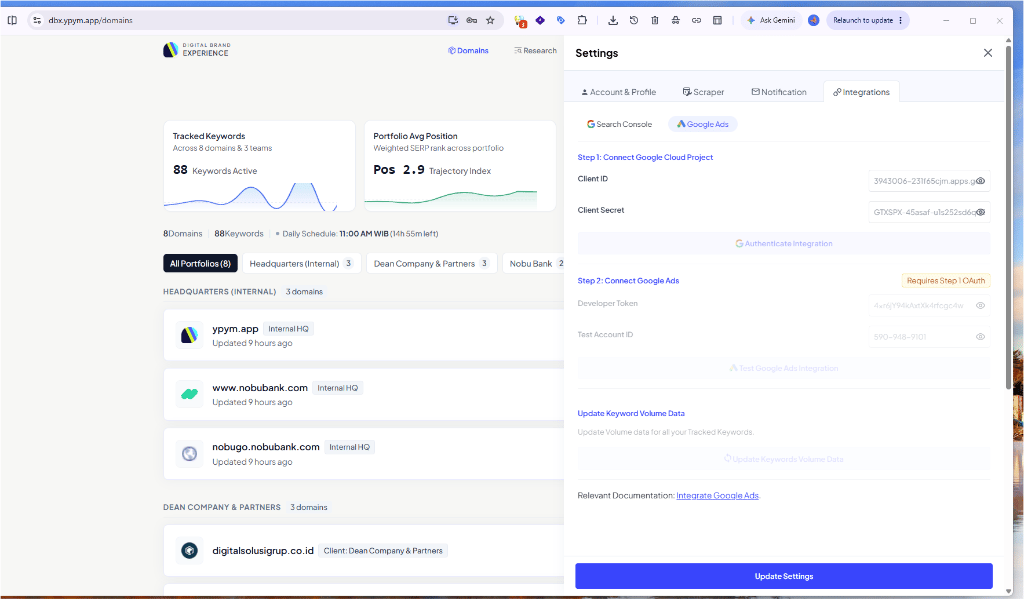
YPYM DBX Google Ads integration modal illustrating Step 1 (Google Cloud Project Client ID & Secret) and Step 2 (Developer Token & Customer Account ID) with Keyword Volume update capabilities.
Architecture Overview
DBX synchronizes Google Ads intelligence through a dedicated three-stage pipeline:Stage 1: Cloud OAuth
Authenticates DBX via Google Cloud Console using client secrets and OAuth 2.0 refresh tokens.
Stage 2: Ads Token
Links your Google Ads MCC Developer Token and 10-digit Customer Account ID.
Stage 3: Volume & Ideas
Fetches real-time monthly search volume, CPC, and keyword ideas without consuming DataForSEO credits.
Keyword Planner Capabilities in DBX v5.3
Once connected, your YPYM DBX instance unlocks four core capabilities:1. High-Density Search Volume & Trends
In your domain’s SERP + AIO table:- Search Volume (SV): Displays exact monthly search query volume.
- Trend Curve: Interactive sparklines detailing query trajectory over the past 12 months.
- 3-Month & YoY Growth Indicators: Identifies fast-rising queries (e.g.
+120% YoY) for immediate editorial or paid campaign prioritization.
2. Commercial Valuation & CPC Bids
- Top of Page Bid (Low Range): Benchmark CPC for bottom page-one ad placements.
- Top of Page Bid (High Range): Benchmark CPC for Top 3 ad placements.
- All monetary metrics automatically convert to your organization’s primary currency (IDR benchmarked at official bank rates or USD).
3. Competition Index Analysis
- Granular 0–100 index assessing paid advertiser competition density.
- Categorized into standard Low, Medium, and High tiers to identify high-volume, low-competition organic keyword gaps.
4. Interactive Ideas Discovery (/research)
- Navigate to Research in the top navigation bar.
- Input a root seed keyword (e.g.
b2b marketplace indonesia) or a competitor landing page URL. - DBX queries the Google Ads API and generates up to 500 relevant keyword variations with volume, competition, and bid economics pre-populated.
- Click + Add to Domain to instantly transition discovered keywords into active rank tracking.
Technical Self-Service Setup Guide
For engineering teams wishing to self-provision their own Google Ads API credentials:Stage 1: Connect Google Cloud Project (OAuth 2.0)
- Log in to the Google Cloud Console.
- Select your organization project or create a project named
YPYM-DBX-Integration. - Go to APIs & Services → Library, search for Google Ads API, and click Enable.
- In OAuth consent screen:
- Set User Type to External (or Internal for Workspace organizations).
- Set App Name to
YPYM DBX. - Add the scope:
- In Test Users, add your Google Ads login email.
- In Credentials → Create Credentials → OAuth client ID:
- Application Type: Web application.
- Name:
DBX Google Ads Client. - Authorized Redirect URIs:
- Click Create and copy your Client ID and Client Secret.
- In YPYM DBX:
- Navigate to Settings (Gear icon) → Integrations → Google Ads.
- Paste the Client ID and Client Secret, then click Connect with Google Ads.
- Complete Google’s OAuth consent screen to store your encrypted refresh token.
Stage 2: Configure Google Ads Developer Token & Account ID
- Log in to your Google Ads Manager (MCC) Account.
- Go to Tools and Settings → Setup → API Center.
- Copy your Developer Token (Test Account token or Basic/Standard Access token).
- Identify your 10-digit Customer Account ID (top-right of Google Ads dashboard, formatted
XXX-XXX-XXXX). - In YPYM DBX:
- Under Step 2 of the Google Ads settings modal, enter your Developer Token and 10-digit Customer ID (without hyphens).
- Click Verify & Save Credentials.
Stage 3: Synchronize Keyword Volumes
- Open your domain dashboard.
- In the domain action toolbar, click Update Keyword Volume Data.
- DBX batches all tracked keywords, requests historical metrics from Google Ads API v26, and updates your search volume and CPC columns in real time.
Support & Assisted Onboarding
Need assistance setting up your Google Cloud project or acquiring a Developer Token?- Email Support:
[email protected] - Engineering Desk:
[email protected] - Response SLA: Within 24 business hours for enterprise tenant onboarding.