
Overview
The Notification panel in YPYM DBX configures automated outbound email summaries and SERP rank alerts. Stakeholders, SEO teams, and account directors can receive regular organic ranking reports directly in their inbox without needing to log in to the dashboard.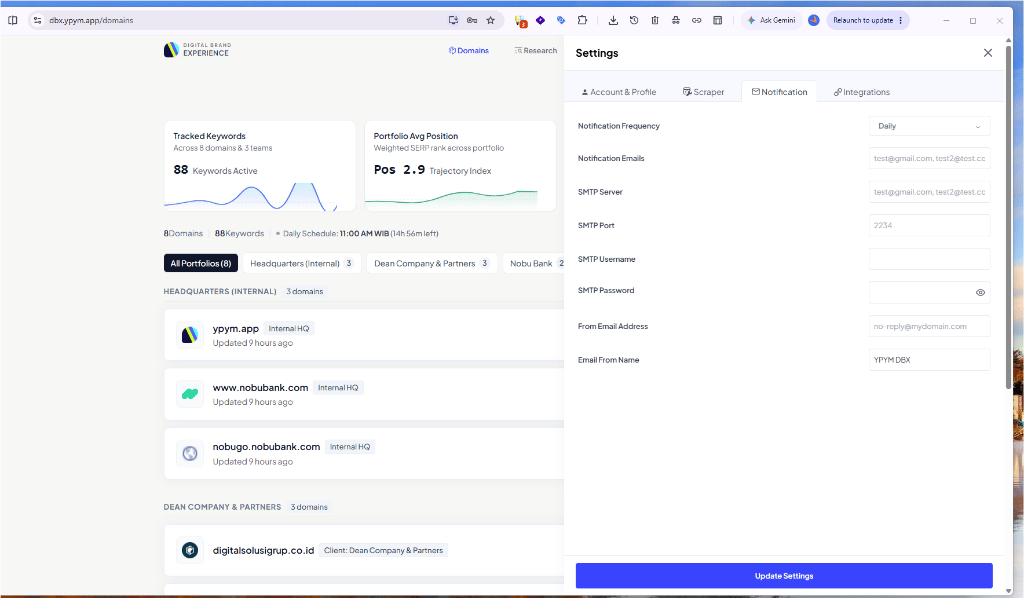
YPYM DBX Notification Settings panel showing digest frequency, recipient distribution lists, and custom authenticated SMTP relay settings.
1. Notification Cadence & Distribution
DBX sends consolidated multi-domain performance digests based on your chosen frequency:select
default:"daily"
Controls the dispatch schedule for ranking digest summaries:
- Daily: Sent every morning following the completion of the daily crawl cycle.
- Weekly: Summarizes weekly rank movements, winners, and losers (sent on Monday mornings).
- Monthly: High-level executive monthly progress report.
- Never: Disables outbound notification emails completely.
string
required
Comma-separated list of recipient email addresses.
2. Authenticated SMTP Server Configuration
To ensure reliable inbox delivery and avoid spam filters, DBX routes outbound email through your organization’s authenticated SMTP relay (e.g., Google Workspace, AWS SES, Resend, or SendGrid).3. Best Practices for Enterprise Delivery
Using Google Workspace SMTP
Using Google Workspace SMTP
If routing notifications through Google Workspace, generate a 16-character Google App Password instead of your primary account password. Set port to
587 with STARTTLS.AWS SES / Transactional Mail Providers
AWS SES / Transactional Mail Providers
For high-volume notifications across multiple client teams, configure an AWS SES SMTP credential. Ensure the domain in From Email Address has valid SPF, DKIM, and DMARC DNS records.